
If you’re staring at the PromeAI pricing page trying to decipher what a “coin” is actually worth in US dollars, I’ve done the heavy lifting for you. After running hundreds of interior design renders and video edits, I found that the math is actually surprisingly friendly.
On the Base plan, a standard image batch costs you about $0.015. Yes, that’s less than two cents.
But to get that value, you need to understand how the coins system allocates budget across different tools like video generation and upscaling. In this guide, I’ll share my personal PromeAI cost calculator logic so you can plan your renders like a professional—but still play like a gremlin at 2 a.m. without breaking the bank.
How Coins Work
PromeAI runs on coins. Every image, video, and edit eats a few coins. Our subscription gives us a bucket of coins each month, and we can buy extra if we run out.
Coin values explained
Here’s the cheat sheet:
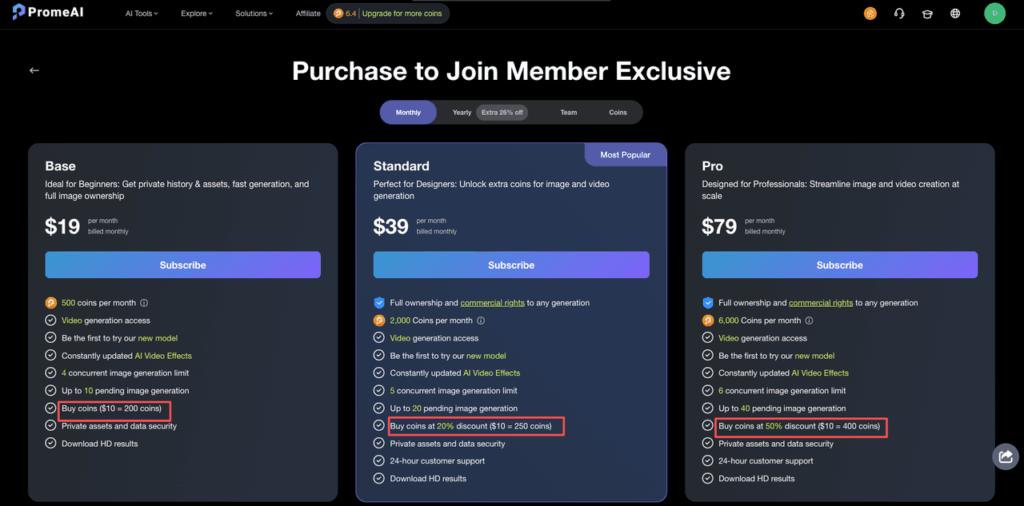
- Base plan: $10 ≈ 200 coins → about $0.05 per coin
- Standard plan: $10 ≈ 250 coins → about $0.04 per coin (20% discount)
- Pro plan: $10 ≈ 400 coins → about $0.025 per coin (50% discount)
Coins are the common currency across everything:
- Image generation
- Video generation
- Editing tools (erase/replace, background removal, sketch-to-render, etc.)
Important detail: unused coins don’t roll over. So each month is basically: “Use them, or say goodbye.” That’s why having a rough cost per render in our heads matters.
If we compare this to token-based tools like OpenAI’s API pricing, we can think of 1 PromeAI coin as a mini budget chunk. PromeAI hides the tokens, we just see a coin count.
Earning free coins
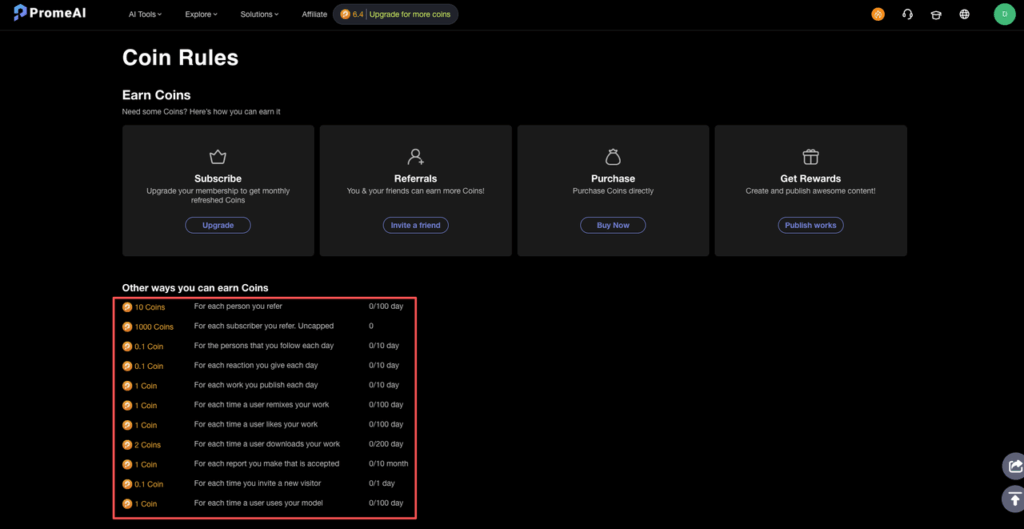
The nice bit: we don’t always have to pay cash.
Based on PromeAI’s current setup and public info:
- Free plan gives 10 coins/month automatically
- Invite friends with a referral link → we both get bonus coins (usually 10–50 coins per person, promo-dependent)
- Contests & giveaways: art challenges, design comps, etc. → prizes are 40–100 coins or even plan upgrades
- Community activities: surveys, beta testing, feedback rounds → sometimes rewarded with coins, but not guaranteed
There are no ad-watching or spammy task systems mentioned in their docs or on the official site, which is good. It feels more like: “Use the tool, share it, join events, get coins.”
We just treat free coins as a bonus buffer, not something we rely on for client work.
Typical Cost Per Task
Here’s where things get real. Let’s talk how many coins we actually spend on the stuff we do daily.
Image generation costs
Baseline numbers:
Basic generation: 0.1 coins per image
- Default batch: 3 images → 0.3 coins total
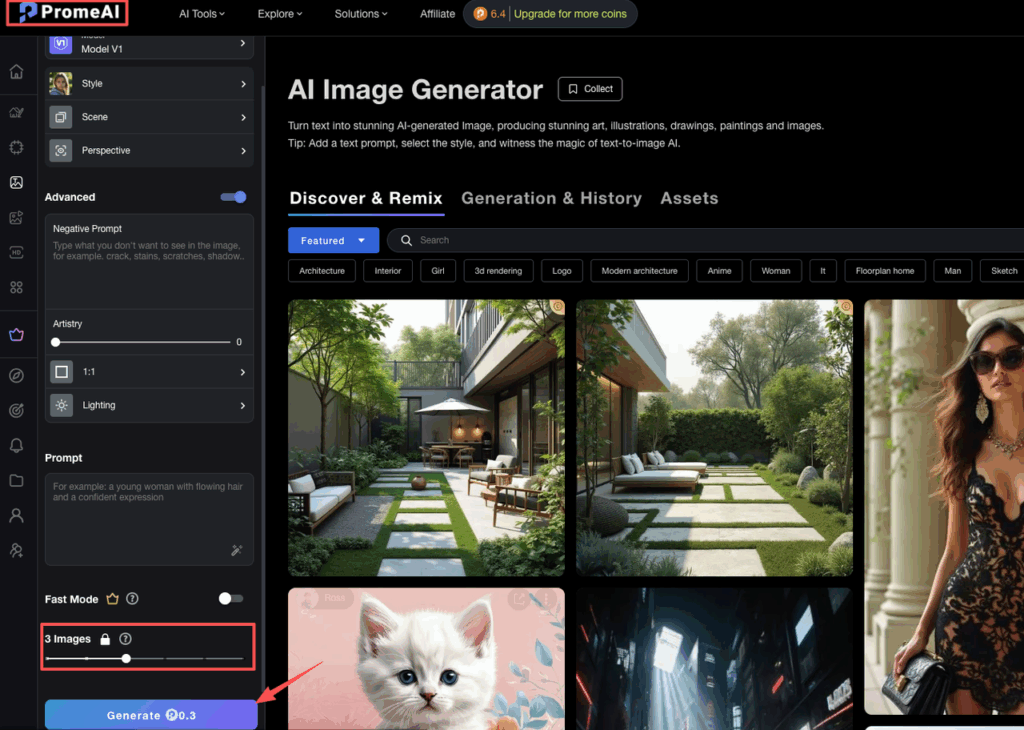
- On the Base plan, that’s about $0.015 per batch (yes, under two cents)
Advanced styles / high-res: 0.2–0.5 coins per image
- So 0.6–1.5 coins per 3-image batch
Upscale/refine: 0.1–0.3 coins per edit
Example:
We’re testing 100 prompts for a product moodboard.
- 100 generations × 0.3 coins (3 images each) = 30 coins
- On Base, that’s roughly $1.50 of raw coin value
So a big inspiration session with hundreds of renders costs less than a stock photo.
Video generation costs
Video is heavier, but still pretty reasonable:
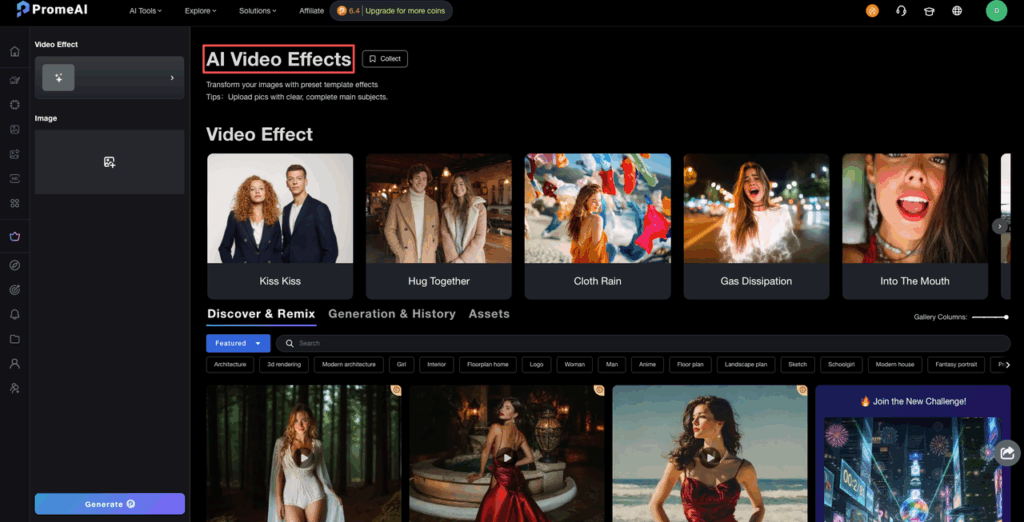
- Short clips (5–10s): 1–2 coins per video
- Longer / higher quality: 2–5 coins, depending on duration and effects
- Video edits/effects: 0.5–1 coin per modification
Example workflow for a social teaser:
- 10 short videos × 2 coins = 20 coins
- 10 quick effect tweaks × 0.5 coins = 5 coins
- Total: 25 coins
On the Base plan, that’s around $1.25 of coin value. For a whole batch of short promos.
Editing tool costs
This is where a lot of day-to-day design cleanup happens:
- Erase & replace / background removal: 0.1–0.3 coins each
- Advanced edits (sketch-to-render, multi-layer work): 0.5–1 coin
- Batch edits (3–5 simple edits): around 1 coin
Example:
We clean 50 product shots for a catalog:
- 50 simple edits × 0.3 coins = 15 coins total
- That’s around $0.75 in Base-plan coin value
This is why the coin system can feel confusing but ends up pretty cheap in practice. The trick is knowing roughly what a session will cost before we start spamming that Generate button.
Plan Comparison
PromeAI’s subscription plans are basically: how many coins do we need, and do we care about commercial rights and speed.
According to their public pricing info and comparison content:
- Free – try the tools, super limited
- Base – hobbyists and light users
- Standard – solo pros who sell their work
- Pro – heavy daily users and studios
- Team – agencies and multi-seat setups
Free tier limits
Free is great for testing, but let’s be honest, we outgrow it fast:
- 10 coins/month
- Relaxed mode only → slower generations
- No video access
- Watermarks on outputs
- No commercial rights (personal use only)
Good to poke the tool and see if we like it. Not good for client projects.
Since the Free plan includes 10 coins automatically, you can test this cost framework without spending a dime. Log in to PromeAI today and see exactly how far those initial credits take your next design concept.

Pro benefits
Here we’re talking about the Pro plan, but Standard is the usual minimum for working designers.
Key perks on the higher tiers:
- More coins per month (thousands, not hundreds)
- Commercial rights on outputs (starting with Standard)
- Priority access to new models and video effects
- Better coin discounts on extra purchases
- Higher limits on concurrent generations and pending jobs
For Pro specifically:
- Around 6,000 coins/month
- 50% discount on extra coins → $10 ≈ 400 coins
- Perfect if we’re generating daily renders, lots of videos, or running multiple brands
Team plan features
Team plans are built for agencies and in-house creative teams.
Typical setup examples based on their published numbers:
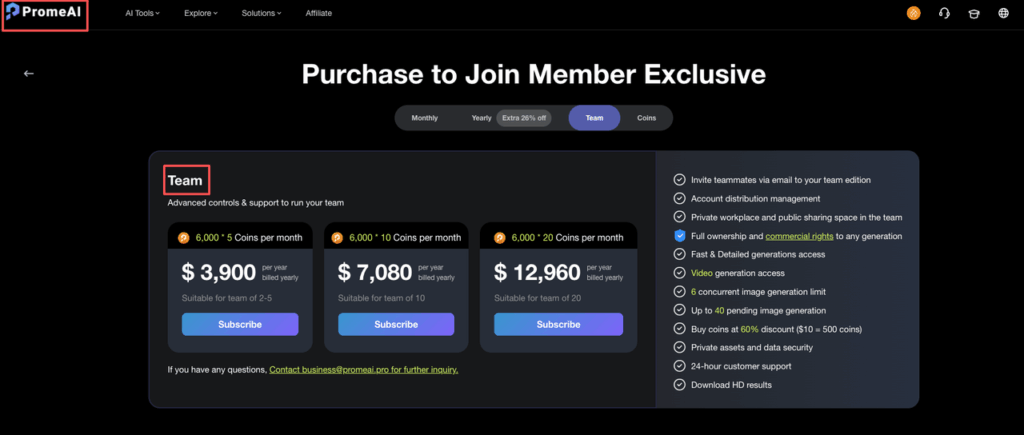
- Example: 20 users at 6,000 coins each → shared bucket + per-seat coins
- Yearly price for 20 users: around $12,960/year (from public references)
- Includes all Pro features plus:
- Multi-seat access
- Shared asset libraries
- Admin controls and centralized billing
- Priority support and custom help
If we’re running multiple designers banging on PromeAI all day, Team is usually cheaper than juggling a bunch of disconnected Pro accounts.
Picking the Right Plan
Let’s map this to how we actually work: casual, professional, or full agency.
Casual user recommendation
If we’re:
- Testing AI for fun
- Doing 30–50 images/month
- Maybe a few edits, no video
We can live with:
- Free if we don’t mind watermarks and slow speed
- Base if we want video, more coins, and HD downloads
Base (yearly) is around $24.5/month for 500 coins. That’s roughly:
- Up to 1,600+ image generations (at 0.3 coins per batch)
- Or a mix of images, some videos, and edits without stressing out
Professional recommendation
For solo designers, architects, or marketers delivering client work every week, Standard or Pro makes more sense.
Standard (yearly):
- Around $29/month
- 2,000 coins/month
- Commercial rights + priority support
2,000 coins is roughly:
- ~6,600 image generations (0.3 coins per batch)
- Or a blend like 500 images, 50 videos, 100 edits at about 300+ coins, which still fits nicely
Pro is for heavy hitters:
- Around $59/month yearly
- 6,000 coins/month
- Best discounts on extra coins
Perfect if we’re doing daily video work, lots of A/B visual tests, or running multiple brands.
Agency recommendation
If we’re a studio or in-house team with multiple designers sharing one tool stack:
- Start with Pro for 1–2 power users
- Move to Team once we hit 3–5+ people using it daily
Team plans:
- Give us per-seat coins plus a shared environment
- Make compliance easier (commercial rights, consistent terms)
- Centralize billing and support
For agencies cranking out thousands of images and hundreds of videos per month, the per-unit cost drops hard once we’re on Team, especially vs everyone freelancing on their own accounts.
Cost Calculator by Workflow
Here’s the simple mental model we’ve been using as a PromeAI cost calculator.
Formula:Total Monthly Cost = Plan Fee + (Extra Coins × Purchase Rate) − Free Coins Value
Where:
- Plan fee = what we pay for Free/Base/Standard/Pro/Team
- Extra coins = coins we buy on top of the monthly bucket
- Purchase rate ≈ $0.05/coin (Base), $0.04/coin (Standard), $0.025/coin (Pro)
- Free coins value = any invites/contests, converted to $ (optional, but nice)
Now let’s plug in some workflows.
1. Casual workflow
- 50 images (3 per gen) → ~17 generations → 17 × 0.3 = 5.1 coins
- 10 simple edits → 10 × 0.3 = 3 coins
- Total ≈ 8–9 coins/month
On Free, we get 10 coins, so our real cost is just our time.
2. Professional workflow
Say we do monthly:
- 500 image generations → 500 × 0.3 = 150 coins
- 50 videos (short, 2 coins each) → 100 coins
- 100 edits (0.3 coins each) → 30 coins
Total ≈ 280 coins.
On Standard with 2,000 coins/month:
- Plan fee ≈ $29/month (yearly)
- Extra coins: 0 (we’re under the limit)
- Total monthly cost: $29 for a serious amount of production
3. Agency workflow
Per designer, monthly:
- 5,000 images → 5,000 × 0.1 = 500 coins (single-image calc) or ~170 batches
- 200 videos → let’s say 2.5 coins each → 500 coins
- 500 edits → 500 × 0.3 = 150 coins
Total ≈ 1,150 coins per person.
On a Team plan with 6,000 coins per user, we’re fine even with spikes. Extra coins are cheaper on Pro/Team anyway.
If we want to get nerdy, we can track usage in PromeAI’s account history and dump it into a quick Google Sheet as our in-house cost tracker. Think of coins like paint on a palette: the point isn’t to hoard it, it’s to know roughly how much we’ll use on each canvas.
Now we’re curious: where do you usually get stuck, picking a plan, guessing monthly coin use, or explaining “AI costs” to clients?
PromeAI Pricing, Coins & Cost Calculator FAQs
How does the PromeAI coins system work for pricing?
PromeAI uses coins as a unified currency for image generation, video creation, and editing tools. Each task consumes a small number of coins, and every plan includes a monthly coin allowance. You can buy extra coins if you run out, with higher-tier plans giving better per-coin pricing.
What is the best way to use a PromeAI pricing coins cost calculator to plan my projects?
A simple PromeAI pricing coins cost calculator multiplies your expected tasks by their coin cost, then maps that to your plan’s coin price. Estimate monthly images, videos, and edits, total the coins, check against your plan allowance, and only factor in extra coin purchases if you consistently exceed that amount.
How much do PromeAI coins cost on different plans?
On average, PromeAI’s Base plan is about $10 for 200 coins (~$0.05 per coin), Standard is $10 for 250 coins (~$0.04 per coin), and Pro is $10 for 400 coins (~$0.025 per coin). Higher plans effectively discount coins and are better for heavy image or video production.
Can I get free PromeAI coins, or do I always have to pay?
You don’t always have to pay for coins. The free plan includes 10 coins per month, and PromeAI often offers referral bonuses, contests, giveaways, and occasional rewards for community activities like surveys or beta testing. These free coins are best treated as a buffer, not for core client work.
How can PromeAI pricing coins cost calculator estimates help me choose the right plan?
Start by estimating a month of work: number of image batches, videos, and edits, then convert that to coins using typical per-task coin costs. Compare the total to each plan’s monthly coins and per-coin price. This lets you see whether Free, Base, Standard, Pro, or Team gives the lowest effective cost.
Recommended Reads
Leave a Reply