Hi, I’m Millie. Last week, I ran a simple test with Vidu Q3 text-to-video: one idea, same product, slightly different prompts. The outputs? Completely inconsistent. Lighting shifted, camera behavior changed, even the object wasn’t stable.
That’s when I started documenting every variable, prompt structure, seed, duration, and what changed between runs. After a few iterations, a pattern emerged. With the right prompt recipe and settings, Vidu Q3 stopped feeling random and started behaving like a controllable tool. This guide is built from that exact workflow.
Before you start (goal, style, length, aspect)
If we skip this step, we usually pay for it later with “cool video, wrong video.” So we decide four things up front.
1) The goal (one sentence, client-ready)
Pick a single use-case. Examples we actually use:
- Concept teaser: “Make a 7-second hero clip for a landing page.”
- Mood exploration: “Generate 5 different lighting moods for the same space.”
- Storyboard placeholder: “Create three shots that match our shot list.”
Write it like a brief you’d send to a teammate.
2) The style (reference + adjectives)
Vidu responds better when we anchor the look. We do one of these:
- Reference a known vibe: “clean product ad, Apple-ish minimal studio” (without copying a brand asset)
- Or pick 3–5 adjectives: “minimal, premium, soft shadows, neutral palette, high contrast reflections”
3) The length (be realistic)
Vidu’s AI text-to-video shines for short clips. We get the best results when we keep it tight:
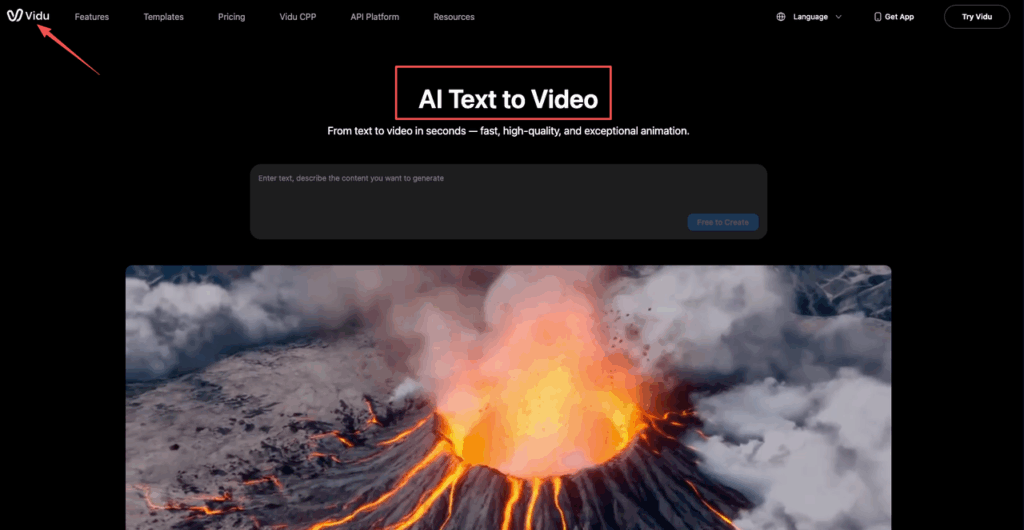
- 6–8 seconds for a single clear action
- 8–12 seconds if we need a small camera move + action
Longer clips can work, but they’re harder to keep consistent.
4) Aspect ratio (design-first choice)
Choose aspect based on where it will live:
- 16:9 for decks, websites, YouTube
- 9:16 for Reels/TikTok
- 1:1 for certain social layouts
Pro tip from our marketing work: decide the safe area before you generate. If you’ll overlay copy, leave negative space in the prompt: “clean negative space on left third for headline.”
The prompt recipe (Subject → Scene → Action → Camera → Style → Audio)
Prompting in Vidu Q3 feels like seasoning. Too little and it’s bland. Too much and everything tastes… confused. Our recipe keeps it structured.
Here’s the template we copy-paste:
- Subject: who/what is the hero?
- Scene: where are we?
- Action: what changes over time?
- Camera: framing + movement + lens vibe
- Style: lighting + materials + quality keywords
- Audio: optional cues (if supported in your workflow/output)
A solid prompt we’ve used (product designer-friendly)
Subject: a matte black wireless earbud case with a subtle logo Scene: minimal studio tabletop, dark gray background, soft fog haze, tiny dust motes Action: lid opens smoothly, earbuds lift slightly as if magnetically, one light sweep across the case Camera: close-up hero shot, slow dolly-in, slight right-to-left parallax, shallow depth of field Style: premium product commercial, softbox lighting, crisp reflections, ultra clean, realistic materials, cinematic contrast Audio: faint whoosh on light sweep, quiet click on lid open, low ambient hum
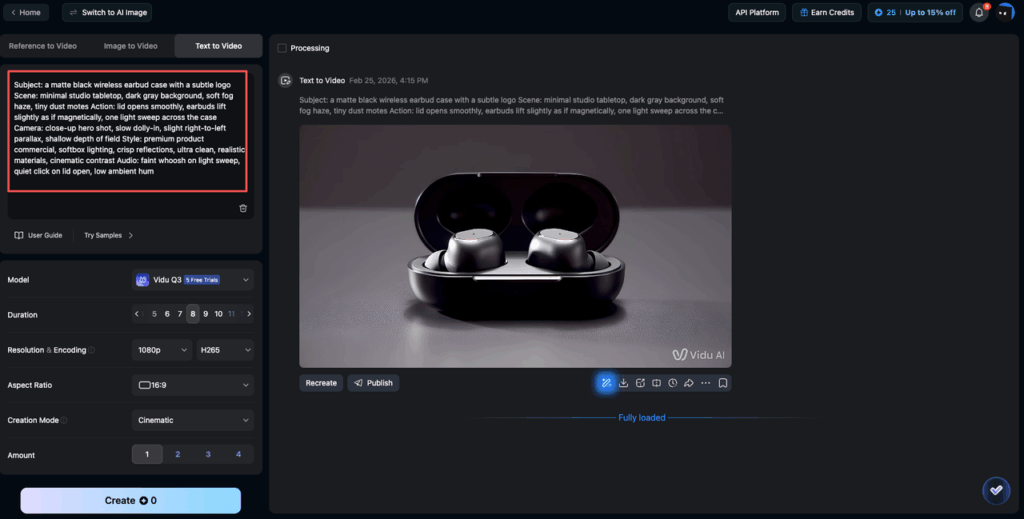
Notice what we didn’t do:
- We didn’t list 25 adjectives.
- We didn’t ask for 3 scene changes.
- We gave one clear action with one clear camera move.
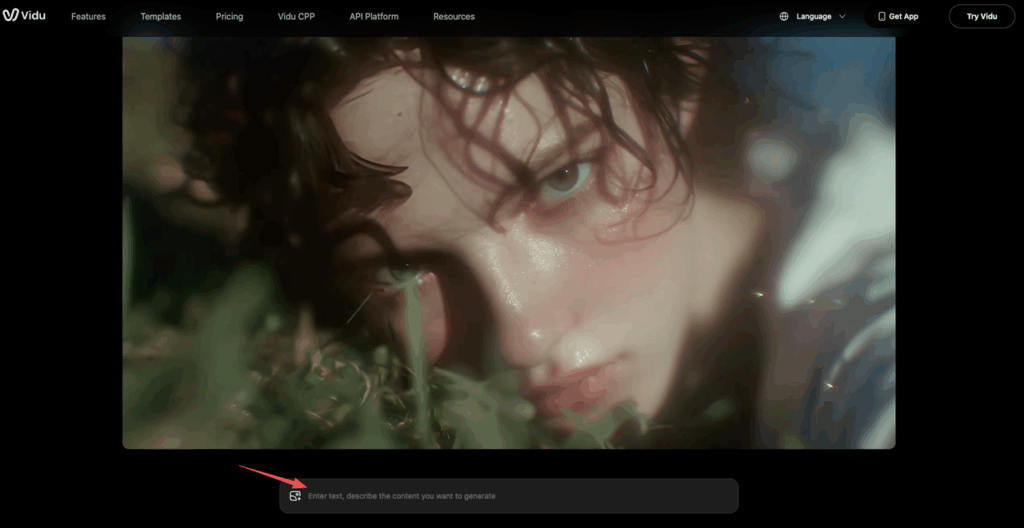
Camera-move vocabulary that works
These phrases tend to produce understandable motion without spiraling into chaos:
- “slow dolly-in” / “slow push-in” (great for product hero)
- “gentle handheld” (adds life: can add jitter if overdone)
- “smooth gimbal tracking shot” (good for interiors)
- “orbit around subject, 15 degrees” (small orbits beat full 360s)
- “tilt up from floor to subject” (architecture reveals)
- “rack focus from foreground to subject” (adds ‘cinema’ fast)
If we want fewer surprises, we also specify:
- “locked-off tripod shot” (no movement)
- “static camera, subject motion only”
Audio cue patterns (dialogue/SFX/BGM)
Audio handling varies by tool and export path, so we treat audio cues as directional, not guaranteed. Still, adding simple cues can help timing and vibe.
Patterns that stay readable:
- Dialogue: “Audio: soft VO (female, calm): ‘Designed for quiet.’”
- SFX: “Audio: subtle click, cloth rustle, faint city ambience”
- BGM: “Audio: minimal synth pad, slow tempo, no drums”
We keep it short and avoid full scripts. If we need real audio, we plan to add it in edit.
For more on what Vidu is positioning with Q3, we reference their official product announcement on PR Newswire: Vidu showcases how the model is advancing AI video into production workflows at a global scale.
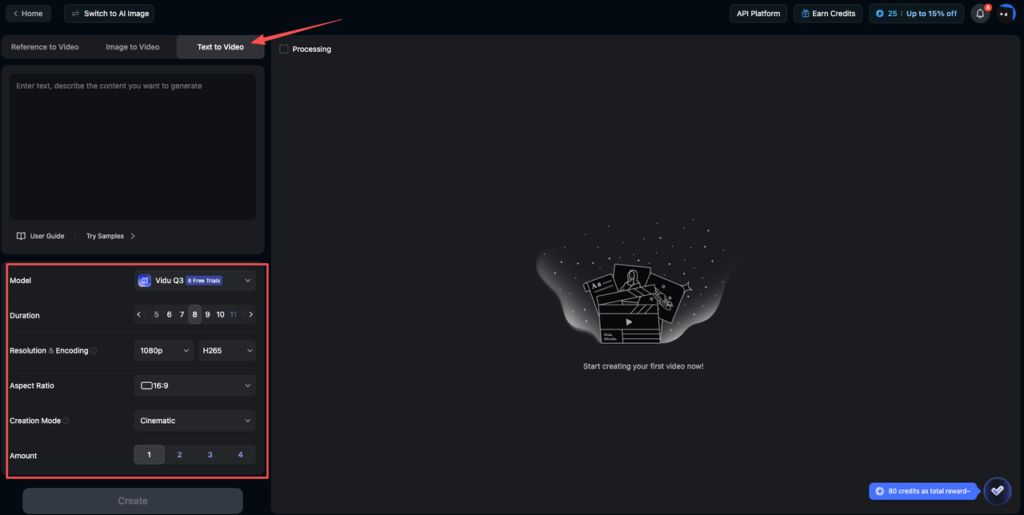
Settings that matter (duration, quality, seed/variations)
We can waste a lot of time fiddling with everything. These are the settings that actually move the needle.
Duration
- Start with 6–8 seconds.
- If motion feels rushed, increase duration slightly rather than stuffing more action into the prompt.
Quality
- We do draft quality for prompt debugging.
- We switch to highest quality only when composition + motion are already correct.
This saves time and credits because high quality won’t fix a vague prompt.
Seed / Variations (our consistency lever)
This is the big one for professional work.
- Use a fixed Seed when you’re trying to improve the same idea (lighting, camera, subject continuity).
- Use new Variations when you want exploration (different takes).
A simple workflow that’s been reliable for us:
- Run 1: Seed: 31415 (baseline)
- Run 2: same prompt, same Seed: 31415, tweak one line
- Run 3: keep prompt, change Seed to explore alternates
We also keep a tiny log (literally in Notes) like:
- Model: Vidu Q3 | Prompt v3 | Seed: 31415 | Duration: 8s | Quality: Draft / High
That makes results reproducible for a team, which matters if we’re delivering client options.
Iteration loop (diagnose → edit prompt → regenerate)
Our best results come from treating Vidu like a junior motion artist: we give clear direction, review, then adjust one thing at a time.
1) Diagnose (pick the single biggest failure)
Common issues we see:
- Subject drift: the product shape changes mid-clip
- Action confusion: lid opens but also rotates, background morphs, etc.
- Camera chaos: unintended zooms, fast pans
- Material wrongness: plastic looks like wax, metals smear
We pick one to fix first.
2) Edit the prompt (surgical changes)
Here are edits that reliably help:
If the camera is wild:
- Add: “Camera: locked-off tripod, no zoom, no shake”
- Or reduce movement: “slow dolly-in” → “subtle push-in”
If the subject changes:
- Add constraints: “same object design throughout, no deformation”
- Simplify action: “lid opens” (remove extra effects)
If the scene morphs:
- Specify environment stability: “static background, consistent lighting, no scene changes”
If hands/fingers look weird (it happens):
- Avoid hands entirely: “no hands visible”
- Or change framing: “close-up product only, hands out of frame”
3) Regenerate (keep the seed until it’s fixed)
When we’re correcting a specific issue, we regenerate with Same Seed, Same Duration, Draft Quality. Then once it’s right, we do the “final pass” with High Quality + Same seed (or best variation).
This loop sounds basic, but it’s the difference between 10 random clips and 3 usable options.
From consulting with marketing teams, the biggest time-saver is limiting changes per iteration. One prompt edit per generation. Otherwise we don’t learn what caused the improvement.
💡 Cross-tool reference: If you’re also working with Runway, their Text-to-Video Prompting Guide covers similar structural thinking — useful for benchmarking prompt approaches across platforms.
Output QA checklist (EEAT: reproducible criteria)
Before we ship anything to a client or drop it into a deck, we run this quick QA.
Visual + motion QA (client-safe)
- Continuity: does the subject keep the same shape/material across frames?
- Stability: any unwanted warping in edges, logos, text, or geometry?
- Camera intent: does the camera move match what we asked (speed + direction)?
- Lighting: consistent key light direction? any “flicker”?
- Brand safety: no accidental brand marks, weird labels, or readable fake text
Technical QA (practical delivery)
- Aspect ratio correct for the destination (16:9, 9:16, 1:1)
- Crop safe areas: space for headlines if needed
- Duration fits the placement (ads/social)
- Export naming: include Model, Seed, Prompt version so we can reproduce
A naming format we use: vidu-q3_product-hero_prompt-v4_seed-31415_8s_high.mp4
Reproducibility (the EEAT part)
If someone on our team asked “How did you make this?”, we should be able to answer with: Model: Vidu Q3 | Prompt: final text | Seed: number used | Settings: duration + quality | What changed between versions: 1–2 bullet notes.
That’s what makes the workflow trustworthy and repeatable, not a one-off lucky generation.
If you’re publishing this content, we’d also add an author bio that states our hands-on testing (how many clips, what constraints, what deliverables) and link to the official product page for transparency: Vidu Q3 – Official Overview.
Question for you (and be specific): where do you usually get stuck — camera motion, subject consistency, or getting a “premium” look without overprompting?
Consistency doesn’t have to be a gamble when you have the right settings at your fingertips. You can explore PromeAI’s video features for free and test this workflow on your next 6-second product hero clip.
Frequently Asked Questions (Vidu Q3)
How to use Vidu Q3 to generate a client-ready 6–8 second product launch clip?
Start by defining four inputs: a one-sentence goal, a clear style anchor (reference vibe or 3–5 adjectives), a realistic duration (usually 6–8 seconds), and the final aspect ratio. Then prompt, run draft quality, and iterate with small edits until motion and composition are usable. See the full feature set on the Vidu AI text-to-video page.
What’s the best prompt structure for Vidu Q3 (and what should I avoid)?
Use a simple recipe: Subject → Scene → Action → Camera → Style → Audio. Keep it focused: one hero subject, one setting, one main action, and one camera move. Avoid cramming dozens of adjectives or requesting multiple scene changes, which often causes “confused” results and unstable continuity.
Which Vidu Q3 settings matter most: duration, quality, or seed/variations?
All three matter, but seed/variations is the biggest lever for professional consistency. Use 6–8 seconds to keep motion coherent, run draft quality while debugging prompts, and switch to highest quality only after the shot looks right. Keep a fixed Seed for refinements; change Seed to explore alternates.
Why does my subject change shape or materials mid-clip in Vidu Q3, and how do I fix it?
Subject drift often comes from too much happening at once or missing constraints. Simplify the action, keep the environment stable, and add explicit guardrails like “same object design throughout, no deformation.” When fixing a specific issue, regenerate with the same Seed, same duration, and draft quality until it stabilizes.
How do I control camera motion in Vidu Q3 so it doesn’t zoom or pan wildly?
Use precise camera vocabulary and reduce movement. Try “slow dolly-in,” “subtle push-in,” or “orbit around subject, 15 degrees” instead of big moves. If it’s still chaotic, override with “locked-off tripod shot, no zoom, no shake” or “static camera, subject motion only” to force stability.
Recommended Reads
Leave a Reply