
If you want to stop guessing your production budgets, you need to understand exactly how Vidu Q3 pricing works under the hood. This isn’t a regurgitation of their sales page; this is a literal calculator for the real cost per 16-second clip when factoring in drafts, client feedback, and prompt failures. I’m Millie, an AI video producer who lives in the trenches of these credit-based tools. I’ve audited our team’s generation habits to figure out exactly where credits vanish and how to stop the bleeding. By the end of this read, you’ll have a clear formula to estimate your monthly Vidu costs, a proven three-step workflow to maximize your free credits, and the confidence to choose the right plan tier without overpaying. Let’s crunch the numbers.

(All plan details should be verified against Vidu’s official page here: Vidu pricing.)
Current plan tiers (what changes across plans)
Vidu pricing is basically a credits system: you subscribe (or use free access), you get credits, and each generation burns some amount of credits.
On the official Vidu pricing page, you’ll usually see tiers that ladder up by:
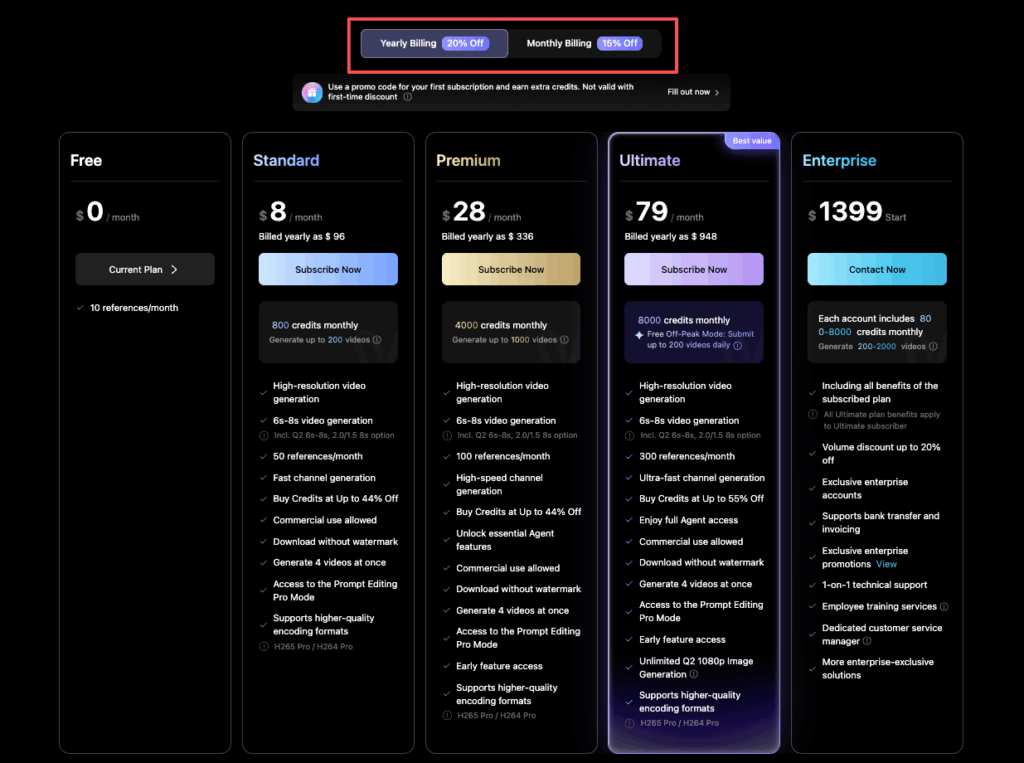
- Monthly credits (the big one)
- Speed / queue priority (how long you wait when it’s busy)
- Feature access (often higher quality modes, fewer limits, or more flexibility)
- Commercial usage / licensing language (always worth skimming if we’re using outputs in client work)
What changes most in real life isn’t just “more credits.” It’s how confidently we can iterate.
- On lower tiers, we tend to “one-shot” prompts because we’re trying not to waste credits. Results: more frustration.
- On higher tiers, we explore variations (different seeds, slightly different prompts), which gets us to a usable clip faster.
If we’re choosing a tier as designers/marketers, we usually ask one question:
Are we buying credits for final renders, or are we buying credits for iteration?
Because iteration is where budgets quietly evaporate.
How credits typically get consumed (estimation method)
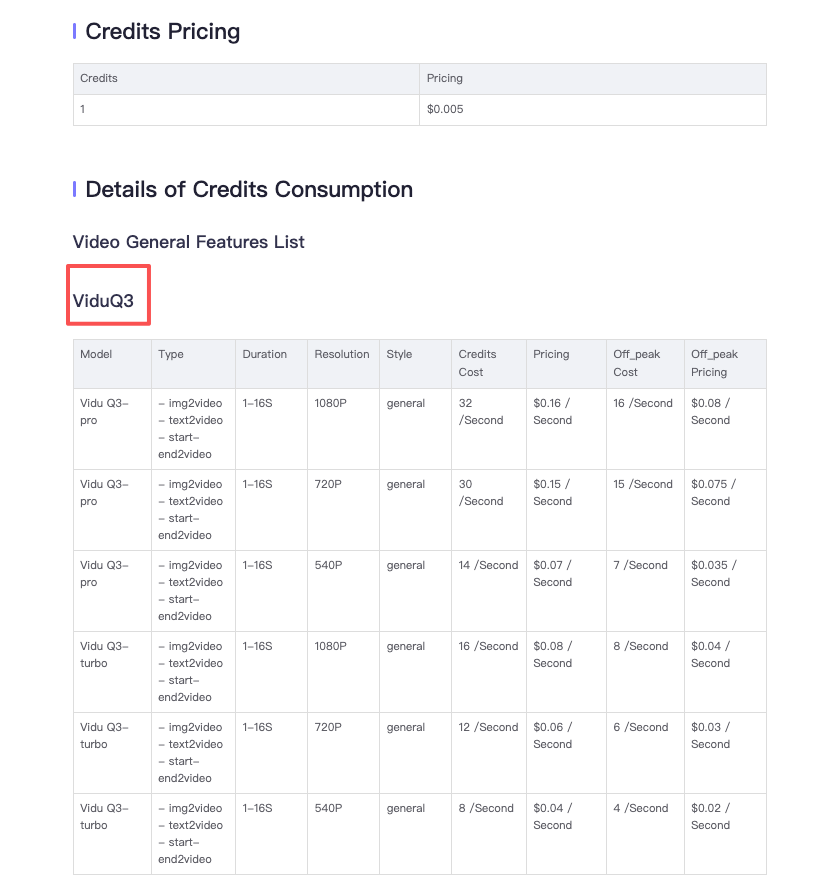
We can’t give a universal “X credits = one video” because usage depends on settings (length, quality, model, resolution, motion intensity, etc.). But we can estimate it in a way that’s good enough for planning.
Here’s the method we use:
- Pick one “standard clip” spec for your team.
- Example spec (keep it consistent): a short social clip at the quality level we ship.
- Run 5 test generations with that spec.
- Write down credits used for each run.
- Compute:
- Average credits per clip
- Median credits per clip (this is often the more realistic planning number)
- Add an “iteration tax”:
- Drafting phase: +50% to +200% depending on how picky the stakeholder is.
A quick rule we’ve found helpful:
- If we’re exploring a new look (new style, new product, new brand tone), assume 2–4 drafts per final.
- If we’re repeating a proven style (same prompt skeleton, same references), assume 1–2 drafts per final.
And yes, credits always disappear faster on weeks when we’re “just tweaking a tiny thing.” Classic.
Free credits & daily login credits (what to expect)
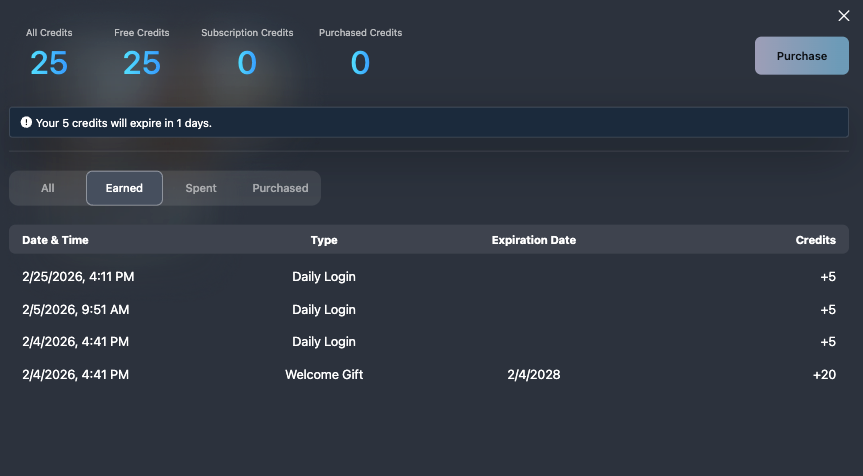
If you’re hoping to test Vidu’s AI text-to-video generator without committing, the free path is real… but it’s not infinite.
From what we’ve seen across tools like this, free access typically comes in two flavors:
- One-time free credits when we sign up (a starter pack)
- Daily login credits (small top-ups that encourage consistent use)
Vidu’s exact numbers can change, so we always double-check the latest details on the official Vidu pricing page before we plan around it.
Here’s what we can realistically expect free credits to be good for:
- Testing prompt structure (does it understand our subject and style?)
- Testing motion vibe (subtle camera drift vs. chaotic action)
- Finding a repeatable prompt “recipe” we can reuse
What free credits are not great for:
- Shipping a full campaign worth of final clips
- Doing 10 rounds of stakeholder feedback (free credits vanish here)
Our practical tip: use free credits to build a “prompt library.”
We keep a tiny note with:
- Prompt (the exact text)
- Seed (so we can reproduce a vibe)
- Model (if Vidu lets us choose)
- What broke (hands? logos? text?) and the fix we used
That way, once we’re on a paid tier, we’re spending credits on outputs, not wandering.
Finding the perfect prompt recipe takes trial and error. We provide enough daily resources in PromeAI for you to thoroughly test your concepts without financial pressure. Start experimenting with your ideas today and build a workflow that actually scales.

Cost-per-video calculator (simple formula + examples)
Let’s make Vidu pricing feel less mysterious.
Here’s the simple calculator we use.
Cost per final video ≈ (Monthly plan price ÷ Monthly credits) × (Credits per draft) × (Drafts per final)
Or in plain English:
- How much one credit costs on our plan
- Times how many credits a typical generation uses
- Times how many attempts it takes to get a clip we’ll actually ship
Example A: “We’re disciplined” (repeatable style)
Let’s say:
- Plan: $P per month
- Credits included: C per month
- Our standard generation uses: G credits
- We usually need: 2 drafts per final
Then:
- Cost per credit = P/C
- Cost per final = (P/C) × G × 2
This is the best-case scenario: we’re reusing a proven prompt, the client likes the direction, and we’re mostly making small variations.
Example B: “It’s a launch week” (iteration party)
Same plan, but now:
- Standard generation: G credits
- Drafts per final: 4–6 (because approvals)
Cost per final = (P/C) × G × (4 to 6)
That multiplier is the whole story.
A quick sanity check we like
Before we commit to a plan tier, we run a mini test:
- Create 10 drafts of our standard clip spec
- See how many credits it actually costs
- Then ask: “How many finals does this plan support per month if we keep our draft count under control?”
If we can’t answer that, we’re basically guessing our budget.
(And if we’re presenting this internally, we’ll cite the source for plan pricing directly from the Vidu platform pricing documentation so finance doesn’t side-eye us.)
Cheapest workflow for production (draft → refine → final)
If we want the cheapest Vidu workflow that still gets high-quality output, we need to stop treating every generation like it’s a final render.
We run a three-stage pipeline:
1) Draft (burn the cheap credits)
Goal: explore ideas fast.
What we do:
- Keep drafts short and lower stakes
- Change one variable at a time (prompt OR seed OR reference), not all three
- Save winners immediately
Our draft checklist:
- Does the subject read correctly in the first second?
- Is the motion usable (not nauseating, not dead)?
- Are there obvious artifacts we can’t fix later?
We also label drafts in a notes doc with:
- Prompt: (copy/paste)
- Seed: (if available)
- Model: (if selectable)
- One-line note: “Good lighting, background too busy”
2) Refine (tighten the prompt like seasoning)
This is where we get strategic. Prompting is like cooking: if it’s too salty, you can’t un-salt it. So we adjust in small moves.
For anyone new to crafting prompts for AI video, Runway’s text-to-video prompting guide covers some solid foundational principles that translate well across tools.
Refine moves that save credits:
- Add constraints (“clean background,” “minimal camera shake,” “product centered”)
- Remove fluff adjectives that confuse the model
- Use a consistent structure (subject → action → camera → lighting → style)
We try to keep our refine loop to 2–3 generations.
3) Final (spend credits only when we’re confident)
We only go “final” when:
- The draft already matches composition and motion
- We’re no longer guessing the vibe
This is the part people skip, and it’s why Vidu pricing feels expensive.
If we do this pipeline right, we’re paying for:
- 6–12 draft/refine attempts total
- But we get multiple finals because the prompt recipe becomes reusable
One more budget saver: if the tool supports it, we lock a Seed once we have a vibe we like. It’s the closest thing to “version control” for aesthetics.
Billing pitfalls (renewals, refunds, failed gens)
This is the part we wish every pricing page explained in plain language. A few things to watch so Vidu pricing doesn’t surprise us.
Renewals: the “wait, it renewed?” moment
- Most subscriptions are auto-renew by default.
- Put a reminder on your calendar for 2–3 days before renewal.
- If your team is seasonal (launch cycles), consider whether you need monthly flexibility.
Refunds: don’t assume
Refund policies vary a lot across AI tools. Before we buy, we check:
- Is there a trial?
- Are unused credits refundable?
- What happens if we cancel mid-cycle?
Always confirm the current policy on the official page or terms linked from it (start here: Vidu pricing).
Failed generations: do we lose credits?
This one matters.
Sometimes a “failed” gen is:
- A true error (server issue, generation fails to complete)
- A “success” that’s just unusable (warped logos, unreadable text, weird faces)
Those two situations don’t always get treated the same.
What we do:
- Screenshot errors and keep timestamps
- If credits were deducted, we contact support with receipts
- We run important finals when we have stable internet + time buffer (sounds obvious, but we’ve all done the 4:58 PM hail-mary)
Team usage: shared accounts get messy
If multiple people share one login, it becomes hard to track who burned credits.
If Vidu offers team features on higher tiers, it may actually save money by reducing duplicated experimentation.
If you want, tell us what you’re making (product renders, architectural flythrough vibes, ad concepts, UI promos). Where do we usually get stuck, getting the first good draft, or keeping the final renders from eating the whole credit pool?
Vidu Pricing FAQs
How does Vidu pricing work with credits?
Vidu pricing is mainly credit-based: you subscribe (or use free access) and each AI text-to-video generation consumes credits. Higher tiers typically increase monthly credits, improve speed/queue priority, unlock more features or higher-quality modes, and may include clearer commercial-use terms—important if you’re delivering client work.
How can I estimate cost per video with Vidu pricing?
Use a simple calculator: Cost per final video ≈ (Monthly plan price ÷ monthly credits) × (credits per draft) × (drafts per final). The big swing factor is drafts per final—repeatable styles often take 1–2 drafts, while launch weeks with approvals can jump to 4–6. Check the Vidu platform pricing docs for the latest credit costs per tier.
How many credits does one Vidu video generation use?
There’s no universal “X credits = one clip” because usage depends on settings like length, quality, model, resolution, and motion intensity. A practical approach is to define a standard clip spec, run 5 test generations, then plan using the median credits per clip plus an iteration buffer.
Are Vidu free credits enough to test Vidu pricing before subscribing?
Usually, yes for testing—but not for shipping. Free access often includes a one-time starter pack plus small daily login top-ups. It’s best used to validate prompt structure and motion style and to build a reusable prompt library, not to survive multiple stakeholder feedback rounds.
What’s the cheapest workflow to keep Vidu pricing predictable?
Treat generations in stages: Draft → Refine → Final. Draft cheaply to explore, changing one variable at a time and saving winners. Refine with 2–3 tight prompt adjustments (constraints, less fluff, consistent structure). Only run “final” when composition and motion are already right to avoid wasted credits.
Recommended Reads
Leave a Reply