Okay, I have to tell you what happened last Tuesday.
I had a client walkthrough in three hours. My hand-drawn facade sketch was sitting on my desk — pencil lines, a few shaded areas, some squiggly trees I definitely can’t explain. I uploaded it to PromeAI’s sketch rendering tool basically out of desperation.
The output? My client thought we’d already started 3D modeling.
But before you get too excited — let me tell you everything. The good and the “wait, what happened to the windows?”

What “Realistic” Means in AI Rendering
Here’s the thing nobody tells you upfront: “realistic” is not one thing. It’s actually three very different things, and confusing them is where most disappointment comes from.
Photorealism vs. Architectural Realism vs. Illustrative Realism
Photorealism means it could be mistaken for a photograph. Perfect lighting, accurate shadows, material grain you can almost touch. This is the benchmark for CGI studios and game studios — and it takes dedicated 3D pipelines to get there.
Architectural realism means it looks like a credible, polished render. The proportions are right. The materials read correctly. A client understands the space immediately. This is what most of us actually need for proposals and presentations.
Illustrative realism sits in between — it’s clearly rendered and intentional, but carries a slight artistic quality. Think high-end architectural visualization with a distinctive style. According to the 2025 State of Archviz Report, illustrative realism is increasingly the preferred output for early-stage client communication across the industry.
AI sketch rendering, including PromeAI, lives firmly in the architectural and illustrative realism territory. That’s not a knock. For most design workflows — early proposals, concept validation, client communication — that’s exactly what you need.
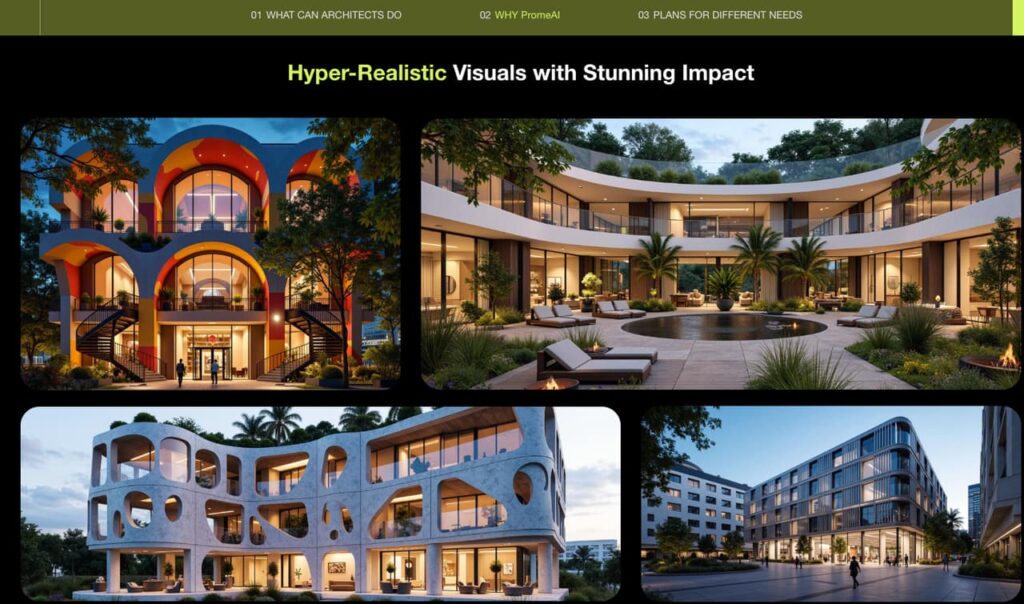
What PromeAI Renders Realistically (With Examples)
Let’s get concrete. I’ve stress-tested this across three use cases.
Architecture Exterior
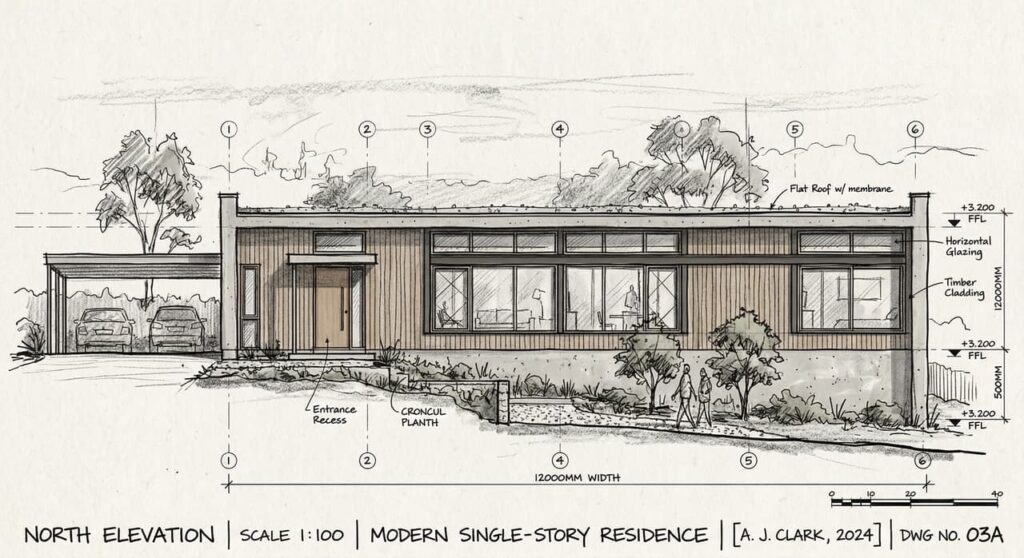
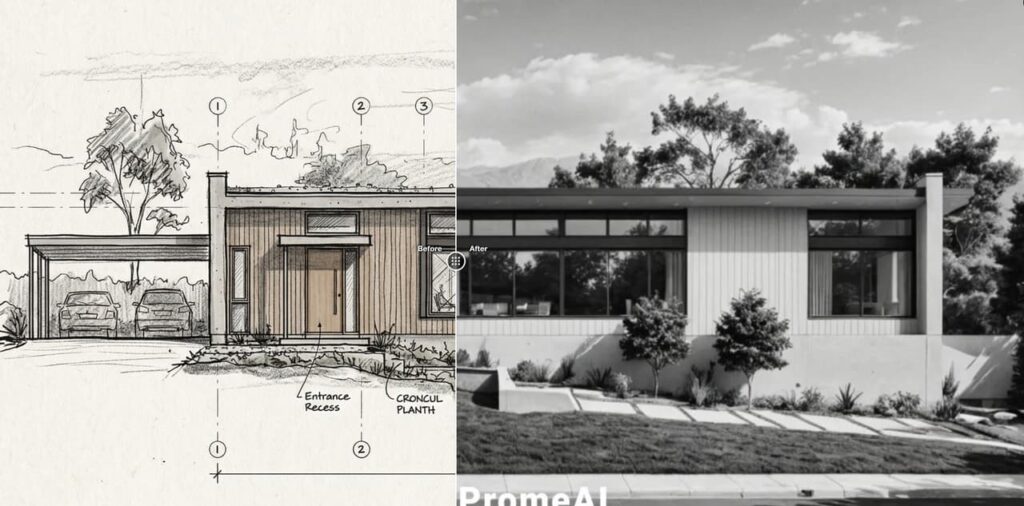
When your sketch has clear structural logic — visible floor lines, distinct facade planes, readable massing — PromeAI handles it really well. I uploaded a rough elevation drawing with a flat roof and large horizontal windows. Strength set to 0.65, style set to Modern Minimalist.
The output preserved the proportions and gave me clean materiality: poured concrete base, glass glazing that actually caught simulated light. It wasn’t photorealistic. But it was absolutely client-ready.
Where it shines:
- Clean geometric forms (rectilinear buildings, pavilions, flat or shed roofs)
- Recognizable building typologies (residential, commercial facade)
- Exterior landscapes — trees, ground plane, sky — fill in convincingly
Interior Space
Room photos and interior sketches might actually be PromeAI’s strongest territory. I took a hand-sketched floor plan perspective of a living room — just furniture outlines, rough proportions, a window indicated on the left wall.
Uploaded it. Style: Japandi. Strength: 0.70.
Within 40 seconds I had a render with warm wood tones, linen textures, soft directional light from that window, and a sense of depth that made the room feel real. My interior designer friend saw it and asked which rendering software I was using.
That’s the kind of result that changes a client conversation.
Product Surface
For product designers: if your sketch shows clear surface transitions and a defined silhouette, PromeAI renders material qualities well. I tested it on a sneaker concept sketch with a chunky sole profile and knit upper. The output rendered the knit texture with surprising accuracy. The sole foam looked like actual EVA foam.
The catch: highly complex product geometry (multiple undercuts, interlocking parts, mechanical assemblies) still struggles. The AI wants to “help” and sometimes invents geometry that wasn’t in your sketch.
Where Realism Breaks Down
Honesty time. This section matters more than the wins.
Complex Geometry
Anything with structural complexity that the AI can’t confidently “read” from your sketch will get interpreted, not faithfully reproduced. Curved cantilevered forms, non-orthogonal facades, intricate parametric surfaces — the output will look plausible but it will not be your design.
This is the most common pain point for architects working in complex geometries. PromeAI is not a substitute for actual architectural visualization software when precision matters.
Hands, Faces, Fine Details
If your sketch includes human figures for scale — common in architecture and fashion — the faces and hands will be wrong. This is a known limitation across AI image generation, not specific to PromeAI. The workaround: render without figures, then composite people in post if needed.
For fashion designers specifically: garment sketches with intricate embroidery, lace patterns, or technical construction details will get a convincing silhouette but the detail rendering is impressionistic at best. Use it for mood and proportion, not technical specification.
Very Rough Input Sketches
If your sketch is truly rough — gestural marks, incomplete lines, ambiguous forms — the AI has to make a lot of interpretive decisions. Sometimes those decisions are inspired. Sometimes you get a building that looks nothing like your intent.
The rule I’ve landed on: your sketch needs to communicate the concept to a human before it can communicate it to the AI. If a colleague couldn’t read it, the AI probably can’t either.
Settings That Improve Realism
The single biggest variable in output quality is how you use the sliders.
Strength, Style, and Detail Sliders
- Strength (0.0–1.0): This controls how much the AI sticks to your input vs. interprets freely. For architectural realism, I stay between 0.55–0.75. Below 0.5 and the AI drifts significantly. Above 0.8 and sketch artifacts start bleeding into the output.
- Style selection: Don’t sleep on this. The style preset does heavy lifting. “Modern Minimalist” and “Scandinavian” consistently give the cleanest architectural outputs. “Industrial” works well for commercial interiors. For fashion, “Editorial” tends to give better fabric rendering than “Realistic.”
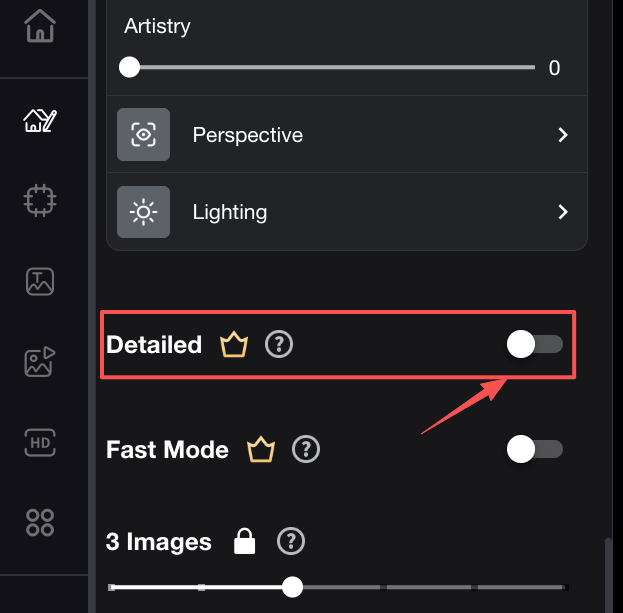
- Detail enhancement: Turn this on for client presentations. Off for quick internal ideation where speed matters more than polish.
One more thing: image resolution of your input sketch matters a lot. A photo of a sketch taken on a bright desk in natural light beats a dim phone photo every time.
Honest Verdict: When Is AI Realism Enough?
For early-stage client presentations, internal team alignment, and concept validation? PromeAI’s realistic drawings are absolutely sufficient. I’ve closed projects with outputs from this tool. My clients have made real decisions based on them.
For permit applications, technical documentation, or competitive tender submissions where precision is required? You still need traditional 3D rendering pipeline. AI is a first step, not the final step.
The workflow I’ve landed on: PromeAI for the first three rounds of client conversation. Traditional rendering for final presentation and documentation. That combination cuts my visualization time roughly in half while maintaining the quality clients actually need when it counts.
Alternatives If Realism Isn’t Sufficient
If PromeAI’s sketch-to-render quality doesn’t hit the bar for your use case, here are three honest alternatives worth testing:
- Midjourney — Higher ceiling for illustrative quality, but less controllable from sketch input. Works better when you’re starting from text prompts and reference images rather than your own sketch.
- Veras (by Evolvelab) — Specifically built for architectural rendering. Better at preserving geometric intent from 3D model screenshots. Steeper learning curve.
- Lumion 3D rendering software — Traditional real-time architectural rendering. Much higher quality ceiling, but requires 3D model input, not sketches. The right tool when you’re past concept stage.

Each of these has real tradeoffs. None of them replaces the others entirely. PromeAI’s actual advantage is speed + accessibility at the sketch-input stage — and for that specific moment in the workflow, it’s genuinely hard to beat.
FAQ
Q1: Can PromeAI produce truly photorealistic renders from a sketch? Not quite — but it produces architectural-quality renders that are client-ready for early presentation stages.
Q2: How does AI realism compare to traditional 3D rendering? Traditional 3D rendering has a higher quality ceiling and better geometric precision. AI rendering is faster and more accessible from rough sketch input.
Q3: What inputs give the most realistic results? Clean, well-lit sketches with clear structural logic and readable proportions. The more legible to a human eye, the better the AI output.
Q4: Is AI realism good enough for client presentations? For concept and early-stage presentations: yes, often convincingly so. For final documentation or technical submissions: supplement with traditional rendering.
Q5: What are the most common realism failures to watch out for? Complex geometry interpretation errors, human figure hands and faces, and very rough or ambiguous sketch input. All three produce “plausible but wrong” outputs.
Where do you usually hit the quality wall in your sketch-to-render workflow? Drop it in the comments — genuinely curious what stage causes the most back-and-forth with clients.
Recommended Reads
Leave a Reply