
Scroll through social media, and you’d think generating flawless video ads and short storytelling sequences takes nothing but a single sentence. But load up Vidu Q3, OpenAI Sora, Veo, Kling, or Runway with a strict commercial brief, and that illusion shatters fast. The gap between viral tech demos and actual, production-ready rendering is absolutely massive.
My name is Millie, and I spend my days building architectural visualizations and AI workflows. To separate the practical tools from the hyped toys, I pitted these five titans against each other using identical prompts, reference images, and unyielding deadlines. One model gave me perfect bilingual lip-sync out of nowhere, another defied physics entirely, and one proved to be a multi-shot powerhouse. Before you commit your budget to a subscription tier, let’s look at what these engines actually spit out.
Decision Matrix: Match Your Use Case to the Right Model
Stop scrolling and squint at this for a second. This is the cheat sheet I wish I’d had before I wasted three hours on the wrong tool.
If You Need Native Audio (Dialogue + SFX Baked In)
All five models support native audio now — but they don’t all feel the same.
Kling 3.0 is the one I’d call first for global campaigns. Multi-speaker dialogue in five languages (English, Chinese, Japanese, Korean, Spanish), with accents and dialects, and lip-sync that actually tracks. I tested it with a bilingual product demo and the sync held across both takes without any extra post work.
Vidu Q3’s longest single-run clip with audio goes up to 16 seconds of dialogue, VO, SFX, and music in one generation. No stitching. If you’re producing a narrative ad or a mini product story with sound, this is your cleanest path.
Sora 2 and Veo 3.1 both have strong “integrated” audio — the sound and visuals feel like they were made together, not layered on top. Veo especially performs well in benchmark alignment tests where audio-visual sync is scored.
Runway Gen-4.5 added native audio in December 2025. It works well now, though earlier in my testing it still felt like the newest member of the team — present, but not quite as fluent as the others yet.
Bottom line: For volume ad work with multi-language audio, start with Kling or Vidu. For a cinematic final with tight audio-visual sync, go Sora or Veo.
If You Need Longer, Coherent Scenes
This is where models separate fast.
Kling 3.0 handles multi-shot prompts natively — you describe each beat, each camera move, each duration, and it generates a connected sequence up to 15 seconds in one run. No frankensteining clips. I used it for a three-beat product spot (close-up → hand interaction → title card) and the visual continuity across shots surprised me.
Vidu Q3’s 16-second continuous generation delivers frame-accurate pacing — the longest single-run of any model here. Great for a flowing narrative that doesn’t need hard cuts.
Sora 2 is the coherence king for world-state persistence. I ran a 10-second product walkthrough — matte-finish water bottle through a minimalist kitchen — and the light behaved correctly the whole time. The bottle didn’t warp. The table didn’t shift. Physics stayed physics. That’s rarer than it sounds.
Google Veo 3.1 maxes out at 8 seconds, which honestly feels short once you’ve used the others. Still excellent for tight product hero shots, but plan around that cap.
Runway Gen-4.5 has been expanding its multi-shot consistency features. With keyframes and motion propagation, you can build longer sequences — but it’s more hands-on construction than single-run generation.
Promptability & Control: Camera Moves and Character Consistency
This is where I get genuinely nerdy, because how a model listens changes everything.
Runway Gen-4.5 wins on control, full stop. Keyframes, motion brush, precise camera direction (pan, truck, orbit, handheld shake), image-to-video, video-to-video. Multi-shot propagation means you change one element and it ripples across the whole sequence. It’s less “prompt and pray” and more “direct a render.” If you need things exactly where you put them, this is your tool.
Kling responds beautifully to structured multi-shot prompts. My format:
Beat 1 [0–5s]: close-up, matte-black product, single LED ring glowing, slow push-in. Beat 2 [5–10s]: hands pick up product, warm kitchen light. Beat 3 [10–15s]: clean white background, title card.
Three reference images fed alongside that prompt? Character and product consistency across all three beats. Kling calls this “element lock” and it’s best-in-class for multi-angle shoots.
Vidu Q3’s director-note prompting system responds to camera language directly — terms like “frame-accurate pacing” and “slow push with audio sync at 8s” actually register. It feels more like writing a director’s note than a prompt.
Sora 2 and Veo 3.1 both respond well to cinematic language: lens type, shutter behavior, tracking moves, parallax. Veo supports reference images for character/product consistency and outpainting for scene extension. Sora’s identity anchors in prompts are strong — describe your subject with specifics (“rounded silhouette, single LED ring, matte-black finish”) and it holds that across the clip.
Cost & Workflow: Drafting, Iteration, Finals
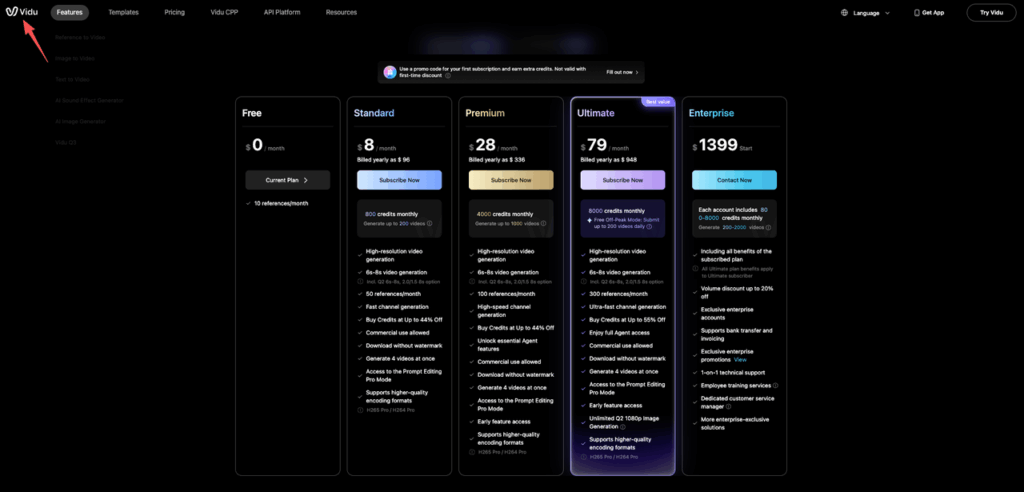
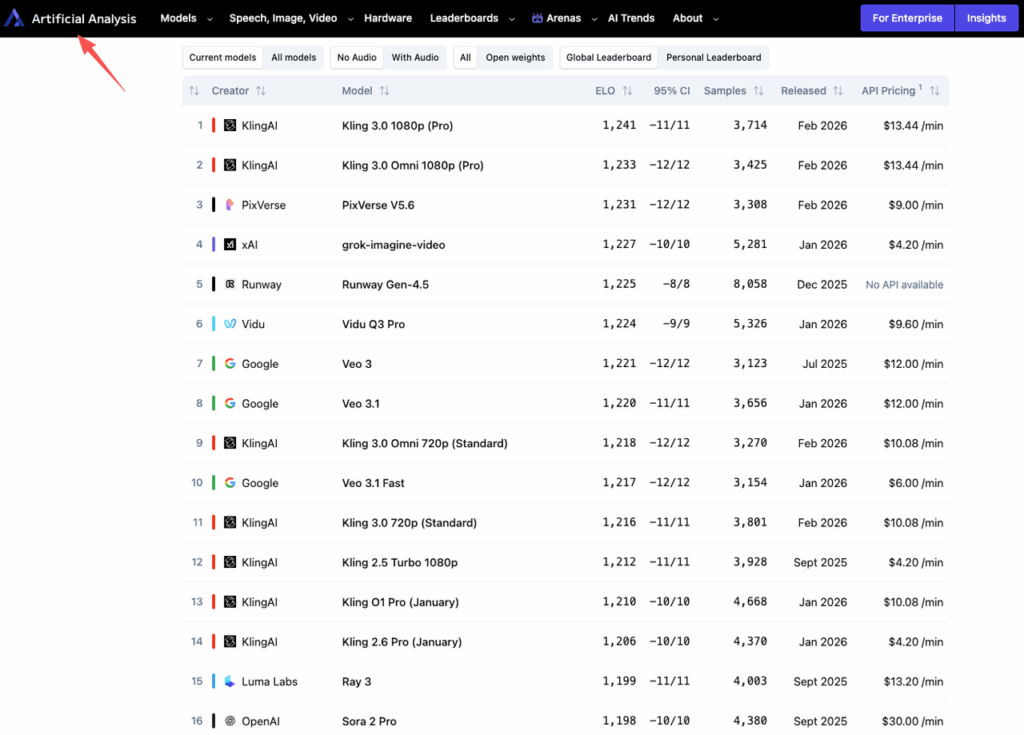
Here’s the reality check on Vidu Q3 pricing and the broader market (as of February 2026 — always verify on official pages since credits shift):
According to the Artificial Analysis Text-to-Video Leaderboard, which tracks independent benchmarks across all major models, cost-per-minute and quality scores vary significantly — and the rankings have shifted notably over the past quarter.
For volume drafting, Kling and Vidu Q3 are the obvious choices. Cheapest per minute, fast generation, good-enough audio to actually evaluate. I can generate 8–10 variations and kill the weak ones before spending real time on anything.
For iteration and control, Runway. The pricing is subscription-based rather than per-minute, so it rewards people who sit inside the tool and refine. That’s exactly how Runway is meant to be used.
For finals, Sora 2 or Veo 3.1. Yes, Sora Pro is expensive at ~$30/minute. But if you’re picking 2–3 survivors from your draft round, spending on a polished final there makes sense.
My actual three-round workflow:
- Round 1 — Breadth: Kling or Vidu Q3. Fast, cheap, native audio. Generate 6–8 variations. Cut ruthlessly.
- Round 2 — Control: Runway. Take your 2–3 survivors and refine with keyframes and motion controls.
- Round 3 — Finals: Sora 2 or Veo 3.1. Coherence, physics, and audio that doesn’t need fixing in post.
Evaluating models for multi-shot consistency shouldn’t require juggling five different subscriptions. We designed PromeAI to streamline your drafting and iteration process into one unified workspace. Start your trial to see how our platform handles your specific camera moves!
Evaluation Checklist: How to Test Models Fairly
Same prompt. Same seed. Three runs per model. Score these:
- Prompt adherence — Did it do what you asked?
- Consistency — Does the subject stay the same across the clip?
- Physics — Does light, motion, and material behavior feel real?
- Audio sync — Does sound land where it should?
- Editability — How easy is it to tweak one thing without breaking everything?
- Multi-shot capability — Can it handle structured sequences (Kling especially)?
- Reference-image consistency — Does your product or character hold across angles? (Test with Kling, Veo, Runway.)
My anchor prompt for product testing:
“[Product name], matte-black finish, rounded silhouette, single LED ring glowing, sitting on a white marble surface. Slow push-in, shallow depth of field, warm practical light from camera left. Ambient room tone, subtle product click at 4 seconds. No music.”
Run it across all five. The differences will tell you more than any benchmark.
⚠️ Quick note on commercial use: Most models allow it on paid plans. Avoid client IP on free tiers. Double-check each platform’s policy before you ship.
Recommendation by Persona
If you’re a solo creator or designer exploring: Start with Kling 3.0 or Vidu Q3. Both have generous free tiers. Both give you native audio and enough control to actually learn what you like. The free watermarked versions are genuinely useful for testing before you spend anything.
If you’re a marketer or brand team: Use Kling or Vidu for rapid option generation — get your 8 variants, pick your 2, then bring Sora 2 or Veo 3.1 in for the narrative final. This workflow keeps costs down while still landing on something cinematic.
If you’re a developer or builder:Runway Gen-4.5 for predictable, controllable outputs with API potential and Adobe pipeline integration. Kling if you need affordable volume — at ~$0.10–0.13/second with audio, it’s the most accessible for building automated workflows.
The tools are genuinely good right now. Better than they were six months ago in ways that actually matter for production work — not just demo reels.
But none of them are “set it and forget it.” The prompt still drives the output. Your structure, your anchors, your camera language — that’s still the work.
Where in your video ad workflow do you usually hit a wall — is it consistency across shots, audio sync, or just the sheer number of iterations before something lands? Drop it below. I’m actively stress-testing these pipelines and building out more specific tutorials based on where real pain lives.
Sources:Artificial Analysis Text-to-Video Leaderboard (Feb 2026) · Vidu Q3 · Kling Guide · Runway Gen-4.5 · Sora 2 · Google Veo
Recommended Reads
Leave a Reply